|
|
|
|
|
This software was checked for viruses 2 months ago and was found to contain no viruses.
Click here
to see antivirus report.
|
|
| |
|
|
Video tutorial for Photocopier Pro 4.0
|
Review
This is official description
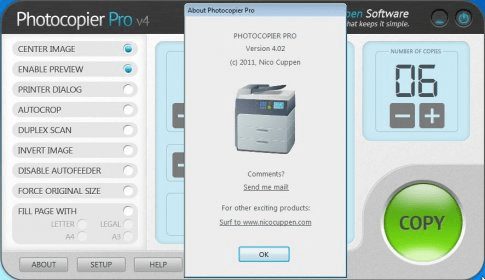
With Photocopier Pro you can make copies just by pressing the Copy button on your scanner.
Main Features:
- Get a preview of the scanned image before printing starts. Manipulate (invert, mirror) the scanned image from the preview window.
- Have greater control over scan resolution.
- Remove superfluous parts of the scanned image with the Auto and Manual crop functions.
- Select the imaging device to use. Convenient when you have both a scanner and a digital camera installed on your system.
- Specify which printer Photocopier should use, specify separate printers for black and white, grey scale and colour copies.
- Instruct Photocopier to pause before printing starts. Convenient when you have scanner and printer attached to your system via a switch box.
- Save the scanned image in a variety of graphic formats (JPEG, GIF, PNG, TIFF etc) from Photocopier's preview window.
The following review written by one of the Software Informer contributors applies to version 3.0
Photocopier Pro is a virtual Xerox machine for your computer. Nico Cuppen Software has created this virtual Xerox machine to use as a real Xerox machine. But it requires a scanner and a printer. So if you have a scanner device to scan your documents or photos and a printer to print your documents and photos then Photocopier Pro can convert it or we can say it lets you use your scanner and printer devices as a photocopier or Xerox machine. By using Photocopier Pro you can use your computer as a photocopier or Xerox machine just as easily as a normal photocopier machine. One of the main extra advantages of this virtual photocopier is that you can use it as a color photocopier if you have a color printer normally all computer users has color printers. It is the cheapest solution for a color photocopier. Producing a copy of a document is just a 1-click task. Another great advantage of this photocopier is that you can see the preview of the scanner document or image before printing on the paper and you can also modify it according to your requirement, so it reduces the cost of mistakes. Scanner is not the limit of Photocopier Pro as it gives you full opportunity to use your other TWAIN devices like digital camera etc. |
- Support many TWAIN devices like scanner and digital camera
- Photocopy is just one click process
- Support black, grayscale and color mode printing
- Option to preview document before printing
|
- Not a freeware
- Printing cost is higher compared a normal photocopier
|
|
Reviewed by: Manoj Goel Reviewer rating: Reviewed: 3 years ago
|
What's new in version 4.0
- Changes to accomodate screens set to Large Font. |
|
Report a wrong version
Report a wrong program title
Suggest a correction
|
Screenshots
|